

You Don't Need 12 Apps to Dominate Anything. You Need Three.
Obsidian owns your ideas, Wispr Flow speaks them, Copilot transforms them. The full workflow.


TL;DR: Obsidian + Wispr Flow + GitHub Copilot. Own your data, speak your thoughts, transform everything. That’s it.
The Problem Nobody Talks About
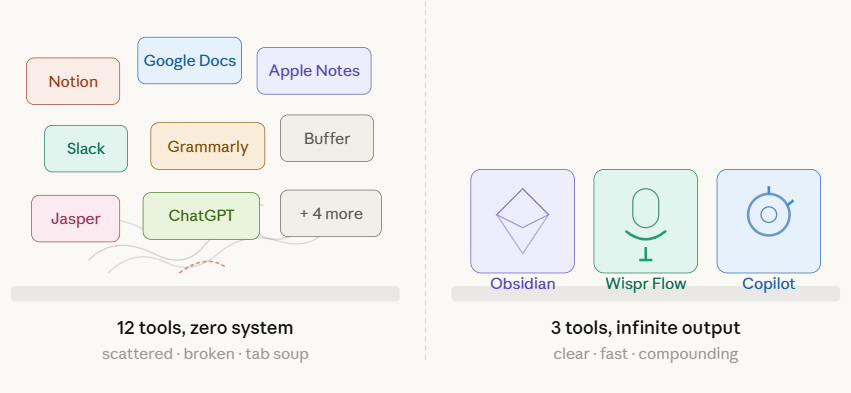
Most creators in 2026 are drowning in tools. Twelve subscriptions. Four writing apps. Two AI chatbots. A calendar tool. A scheduling tool. A CRM they never update. And somehow, despite this entire arsenal, they still stare at a blank page every morning wondering what to write.
The stack is bloated. The output is anemic. Something is fundamentally broken.
Here is what is actually broken. Three things. First, writing is slow and you are burning out because you are forcing yourself to type every thought from scratch. Second, you turned to AI to help, and now you sound like every other LinkedIn ghost. Third, your ideas are scattered across a dozen apps with no connective tissue, no system, no compounding.
This article is about fixing all three with exactly three tools. Not a framework. Not a philosophy. Three pieces of software that cost you almost nothing and replace workflows that used to require a content team.
Obsidian. Your Brain, On Disk
Let’s start with where your ideas live. Right now, probably everywhere. Apple Notes. Google Docs. Random Slack messages to yourself. A Notion workspace you set up six months ago and haven’t touched since.
Obsidian changes this by doing something radical - it stores everything as plain Markdown files in a folder on your machine. Not in someone else’s cloud. Not in a proprietary database you can’t export from without three business days and a support ticket. Just text files. In a folder. On your hard drive.
This sounds boring until you realize what it unlocks.
You own the files. Completely. If Obsidian disappears tomorrow - if the company folds, if they pivot, if they paywall everything - your notes are still sitting in that folder. Copy them anywhere. Open them in any text editor. They are yours forever. No export gymnastics. No vendor lock-in. No “please download your data within 30 days” emails.
Markdown is also the native language of large language models. When you hand an LLM a Markdown file, it understands the structure instantly - headings, emphasis, lists, code blocks. No conversion needed. No reformatting. Your notes are already in the exact format AI works best with. This matters enormously for what comes next.
Everything lives in one searchable, linkable vault. Every idea you have ever captured, every draft, every prompt template, every reference - all of it searchable with a single keystroke. You can link notes to each other. You can build a graph of your thinking over time. You can run batch operations across hundreds of files because they are just files on a filesystem.
The graph view is nice. The backlinks are useful. The daily notes and templates are handy. But strip all of that away and the real power remains unchanged - your entire intellectual output lives in a folder you control forever, readable by any tool, owned by you alone.
Obsidian by itself will not change your life. But Obsidian as the foundation for everything else? That is what makes the rest of this stack devastating.
Wispr Flow. Speak at the Speed of Thought
Here is where most people lose the game. They have ideas - good ones, actually - but the bottleneck is the keyboard. Typing is slow. It is effortful. It introduces a filter between your brain and the page that kills momentum. By the time you have typed out paragraph three, you have forgotten the insight that was going to make paragraph seven brilliant.
Wispr Flow removes the keyboard from the equation. You toggle a hotkey, start talking, and watch accurate text appear in whatever application you are using. It is not just dictation - it cleans up your speech, handles punctuation intelligently, and produces genuinely readable text from natural, sometimes rambling, spoken thought.
What changes when you adopt this is hard to overstate. Medium-to-long pieces never require the keyboard again. I have essentially stopped typing for anything longer than a sentence. The writing sounds narrative and conversational, not robotic, because you are literally speaking out loud. That warmth and cadence is baked into the output automatically. You do not have to engineer it in post.
The velocity shift is staggering. Ideas that used to take 30 minutes to type now take 5 minutes to speak. A 10-minute voice note becomes a 2000-word rough draft. That is not an exaggeration. That is my Tuesday.
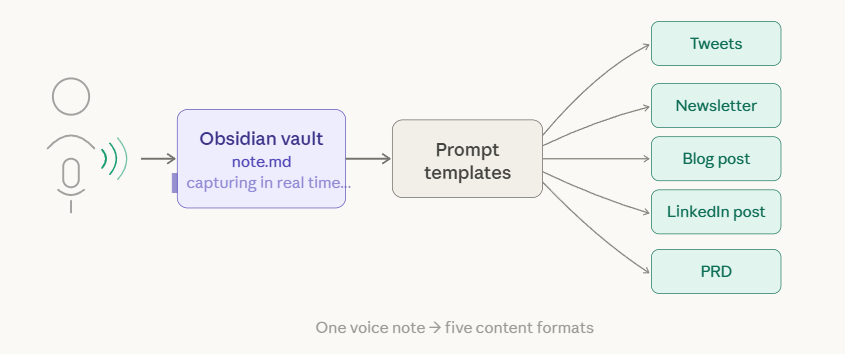
The workflow is dead simple. Open Obsidian. Create a new note. Hit the Wispr Flow hotkey. Start talking. Your thoughts flow directly into your vault in real time. When you stop talking, the text is just there - already in Markdown, already in your system, already searchable and linkable and ready for transformation.
One downside you must know about. If you speak for 10 minutes and it was not recording for whatever reason, that content is gone. No buffer. No recovery. No “restore last session.” Get in the habit of checking the indicator before long sessions. Lose one great rant and you will never forget to check again.
Use it for everything - notes, emails, prompts, drafts, brainstorms, meeting summaries, anything that requires more than a sentence. The friction of typing disappears, and with it, the resistance to capturing ideas. You start capturing more because it costs you almost nothing to capture.
GitHub Copilot. Transform Everything
You have your ideas in Obsidian. You spoke them in with Wispr Flow. Now you need to turn raw voice notes into finished content. This is where GitHub Copilot enters.
I use the GitHub Student Pack, which gives you access to Claude, GPT-4o, and Gemini - flagship models from every major provider - through a single interface. There is a monthly quota, but I have never come close to hitting it. Even without the student pack, the paid tier is a fraction of what you would spend subscribing to each model separately.
But the real value is not the chat interface. It is not asking Copilot random questions or having it debug your code. The real value is using your raw voice notes as input and running them through prompt templates to produce finished, voice-matched outputs.
Think about what one voice note can become. Five tweets that distill the core insight. A newsletter essay that expands on it with structure and nuance. A blog post with headers and scannable sections. A LinkedIn post with a different angle optimized for that audience. A PRD if the idea is product-shaped. An email pitch if it is outreach-shaped. You speak once and transform infinitely. The voice note is the raw material. The prompt templates are the machinery. The outputs are the products.
Here is the insight that makes this click - the AI does not create your ideas. It reshapes them into different containers. The thinking is yours. The unique perspective is yours. The formatting, structuring, and platform-specific optimization is automated. You are not outsourcing your brain. You are outsourcing the packaging.
The Workflow in Practice
Voice -> Obsidian -> Prompt Templates -> Polished OutputThis is how the pieces connect in daily use.
You dictate into Obsidian using Wispr Flow. Raw thoughts, no editing, no self-censorship. Talk through the idea completely. Get the ugly first draft out of your head and into a file. You can let it sit or process it immediately - sometimes I revisit voice notes the next day with fresh eyes, sometimes I transform them within minutes. Both approaches work depending on the material.
Then you open GitHub Copilot and select the voice note file as context. The model can now see everything you said. You run it through a prompt template - “Turn this into a Twitter thread” or “Extract the core argument for a newsletter” or “Structure this as a blog post.” The model takes your raw thinking, shaped by your voice and your knowledge base, and formats it for the target platform.
You include your Knowledge Base folder so the output matches your voice, references your background, and speaks to your audience. More on this in the next section - this is where the stack goes from useful to unfair.
Finally, you edit the output. AI gives you 80 percent. You polish the remaining 20. That is still dramatically faster than starting from a blank page, and the 20 percent you add manually is precisely the part that makes the content yours.
The Knowledge Base Lock Yourself In
This is the secret weapon of the entire stack. Not the tools themselves, but the context layer that makes them irreplaceable.
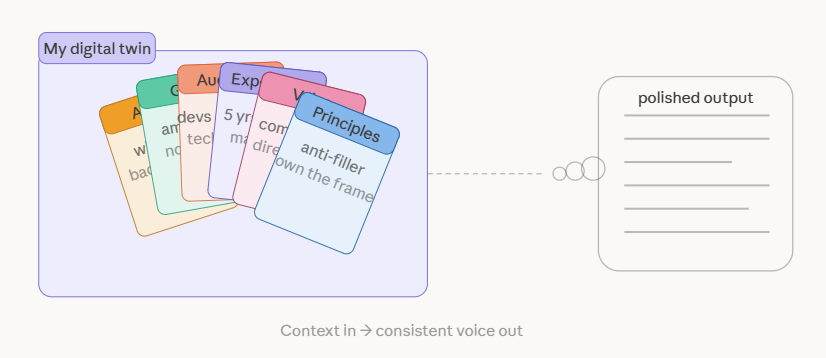
Create a folder in your vault. Call it digital-twin, knowledge-base, whatever resonates. Fill it with files that define you. Not your resume - you. The way you think, the way you speak, the audience you serve, the principles you refuse to compromise on.
Here is what goes in it:
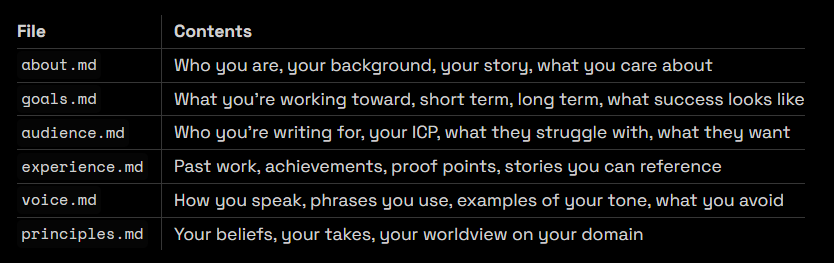
The critical design decision is this - keep your prompt templates generic. Do not hardcode your personality into them. Instead, pull personality from this digital-twin folder every time you run a transformation. One prompt template that says “Write a tweet thread about this topic” becomes YOUR tweet thread when the model has context about your voice, your audience, and your principles. The same template works for anyone who builds their own knowledge base. The personalization lives in the data, not the instructions.
Include this folder as context in every transformation prompt. The AI stops sounding generic and starts sounding like you, because it actually knows what “you” means. It knows your audience is early-career marketers, not enterprise CTOs. It knows you write short sentences, not compound paragraphs. It knows you believe in ownership over convenience.
Maintain these files as you evolve. New achievement? Add it to experience. Refined who you are writing for? Update the audience file. Changed your mind about something? Update principles. Your knowledge base grows with you, and the outputs improve automatically because the context improves.
This is also why I say “lock yourself in.” Not to a vendor - you own every file. Lock yourself into your own system. The more you invest in this knowledge base, the more valuable every transformation becomes. Your switching cost is not a subscription - it is the months of accumulated self-knowledge that makes your outputs uniquely yours.
Prompt Templates as a Transformation Library
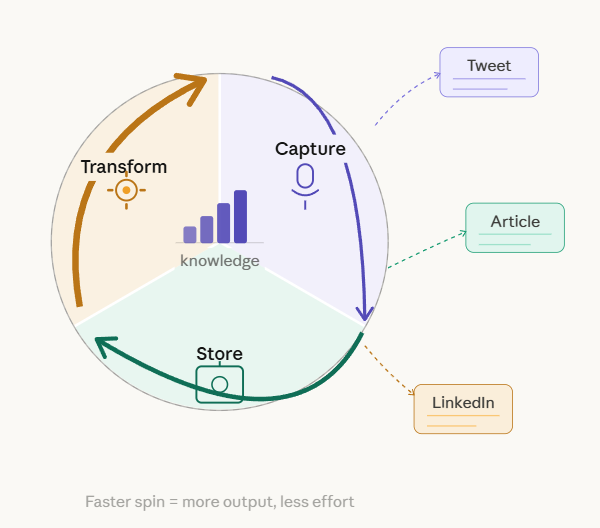
Prompt templates are the last piece. Store them in Obsidian alongside everything else. Include your digital-twin folder using the @ directive in GitHub Copilot - every prompt automatically pulls your voice, principles, and audience context without you pasting anything manually. One template works everywhere. You sound like you across all formats.
Here are starting points.
For Twitter, the template is straightforward:
Take this voice note and extract 5 standalone tweets. Each should be punchy, under 280 characters, and capture one distinct insight. Use my voice and speak to my audience.
For newsletters, you want expansion and structure:
Transform this voice note into a newsletter essay. Open with a hook, develop the core argument, include a personal angle, and end with a clear takeaway. Match my writing style from the digital-twin folder.
For blog posts, you need scannable formatting:
Structure this voice note as a blog post. Add headers, break into scannable sections, and expand thin areas with relevant detail. Keep my voice throughout.
For LinkedIn, the framing shifts:
Reframe this idea for a LinkedIn audience. Professional but not corporate. Lead with the insight, add context, end with engagement. First-person, conversational.
For PRDs, you extract product thinking:
Extract the product thinking from this voice note. Structure as Problem, Proposed Solution, Key Features, Success Metrics, Open Questions.
The more templates you build, the more output you generate per hour of input. One 10-minute voice note becomes a week of content across platforms. The marginal cost of each additional piece of content approaches zero because the thinking was already done - you are just reshaping the container.
Why This Stack Wins
The math is simple. Look at what three tools replace:
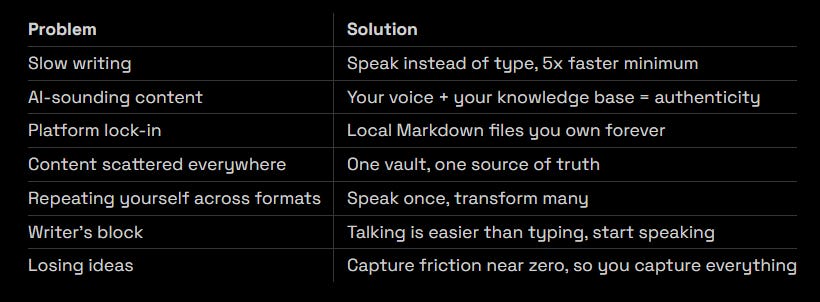
The cost is essentially zero if you are a student. Obsidian is free for personal use. Wispr Flow has a free tier. GitHub Copilot is free with the student pack. Even without the student discount, the total cost is less than one month of a single enterprise SaaS tool. You are replacing an entire content team’s worth of output with three lightweight applications and a folder of text files.
You do not need 15 tools. You do not need a complex system with Zapier automations and three-step integrations. You need a place to store thoughts - Obsidian gives you local, LLM-ready files you own forever. You need a way to capture them fast - Wispr Flow lets you speak at the speed of thought. You need a way to transform them into anything - GitHub Copilot plus templates turns raw ideas into finished content.
Build the knowledge base. Collect the prompt templates. Speak your ideas. Then let the stack do the rest.
The people winning the content game in 2026 are not the ones with the most tools. They are the ones who capture more, own more, and transform more - with less friction at every step. This is the stack that makes that possible.