

My Second Brain Setup That Actually Compounds (Obsidian Edition)
Why Obsidian beats every SaaS note app — and the exact configuration that makes it feel inevitable.

I firmly drowned myself in Obsidian today. Not because it was trendy, not because some productivity YouTuber told me to, but because I got tired of renting my own brain to other people’s servers.
Think about it. Every note you’ve ever written in Notion, Google Docs, or Evernote lives on someone else’s machine. You pay monthly for the privilege of accessing your own thoughts. And if they shut down, pivot, or jack up prices? You scramble. You export. You lose formatting, links, context. Years of thinking, gone or mangled.
I wanted something different. A system where I own the data, where the files sit on my hard drive as plain Markdown, where no company can hold my knowledge hostage. And I wanted it to compound - every note making the next one easier, every connection surfacing something I’d forgotten I knew.
Here’s how I built it in a single day.
The Philosophy That Changes Everything
I didn’t install a note-taking app. I built infrastructure.
Three rules governed every decision. First, locality. Every note is a .md file sitting in d:\Atharva\NOTES. If Obsidian disappears tomorrow, my entire knowledge base survives. Try that with Notion. Second, start fresh. I didn’t import my old mess from Google Docs. I let the structure earn its place organically, note by note. Importing old chaos into a new system just gives you organized chaos. Third, never delete. I don’t destroy notes. I move them to an Archive folder. Digital storage costs fractions of a penny per gigabyte. Regret costs a lot more.
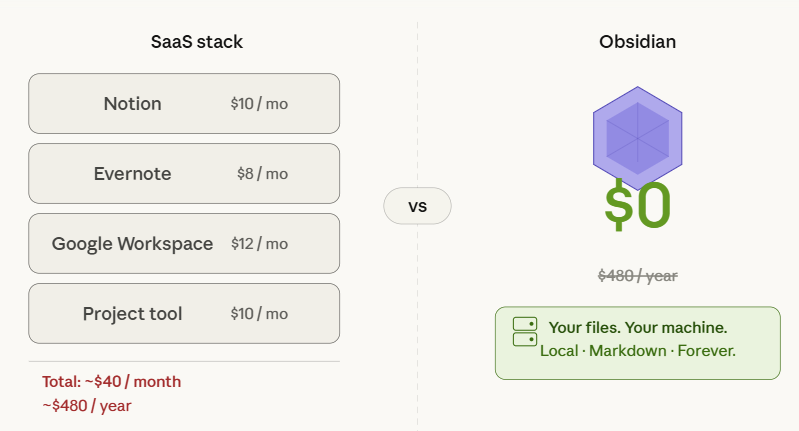
This philosophy matters because it inverts the SaaS model. Instead of $10/month for Notion, $8/month for a note app, $15/month for a project tool - all holding your data in proprietary formats - you pay once for Obsidian (it’s free, actually) and your files are yours forever. Plain text is the most durable data format humans have ever invented.
Setting Up the Vault
The folder structure needs to be flat enough to be useful but organized enough to not become a junk drawer. I use a prefix trick - _Quick Notes gets an underscore so it pins to the top of the file explorer. This is my inbox, the place where raw thoughts land before they get processed.
Below that sits META, the engine room. This holds my templates, web clippings, Copilot prompt files, and Excalidraw drawings. Then Daily Journal for chronological anchoring - one file per day, auto-generated. Substack and Tweets are output factories where drafts get assembled. AccuKnox holds project-specific work.
The critical principle here is don’t over-folder. If you bury ideas three directories deep, they die in silence. Instead I use Maps of Content - plain notes that act as hubs, listing links to other notes on a topic. They’re like a table of contents you build as you go, and they flex as your thinking evolves. Folders are rigid. MOCs are alive.
For aesthetics, I use the Border theme with JetBrains Mono as the font. This sounds trivial but it isn’t. If your writing environment looks like a code terminal from 2004, you won’t want to open it. The Iconize plugin lets me add emojis to folder names without breaking sort order, which makes scanning the sidebar almost instant.
The Shortcuts That Actually Matter
Speed in Obsidian comes from never touching the mouse. I mapped these on day one and forced myself to use them until they became reflexive.
For navigation, Ctrl + O is the “jump to anything” command - it opens a fuzzy file finder that searches your entire vault in milliseconds. Ctrl + P opens the Command Palette, which lets you run any operation without hunting through menus. Ctrl + Shift + Tab quick-swaps between Obsidian and whatever else you have open. And Ctrl + Numpad0 opens today’s daily note, which I hit first thing every morning.
For window management, Ctrl + N spawns a new quick note instantly. Ctrl + Left/Right Arrow toggles the sidebars, giving you focus mode in a single keystroke.
Then there’s the AI and tools layer, which is where the real leverage lives. Ctrl + Shift + I opens Copilot Chat right inside Obsidian. Alt + I tosses whatever text you have selected into Copilot for processing. Ctrl + Shift + C copies an Excalidraw embed link. Shift + Alt + O triggers the Web Clipper from your browser. And Ctrl + Shift + G does a Git commit and sync, pushing everything to the cloud as a backup.
That entire layer - from capturing a web article to refining a draft with AI to backing it up - happens without leaving the editor. No tab switching, no copy-pasting between apps, no context loss. This is where the productivity ROI lives. Not in the features themselves, but in the elimination of friction between them.
The Content Assembly Line
I don’t sit down and “write” in the traditional sense. I assemble. The process has stages, and each stage has a specific tool.
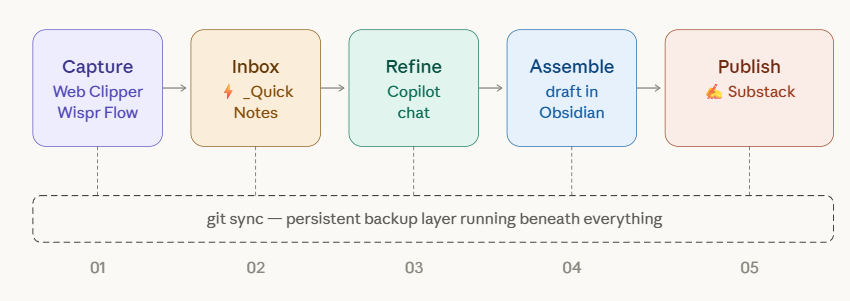
It starts with the dashboard. I use the Dataview plugin to create a launchpad on my homepage that auto-queries the vault. It shows me active drafts, notes tagged #urgent, and recent quick notes. I never manually maintain this view. I just tag a file, and it surfaces where I need it. This alone saves me 15 minutes a day of “what was I working on?” confusion.
Capture happens through the Web Clipper. Found a great article? Shift + Alt + O saves it to META/Clippings with metadata intact. But the real trick is phantom links. If I have an idea but no note for it yet, I type [[Future Idea]] right in whatever I’m writing. This creates a link in the knowledge graph to a note that doesn’t exist yet. When I eventually create it, every reference is already connected. I’m linking ideas before they’re even born.
For ideation, I don’t type first drafts. I speak them. Wispr Flow lets me toggle voice input, talk for five minutes, and paste the cleaned-up transcription into a new note with Ctrl + N. Writing speed goes from maybe 40 words per minute to 150. That’s not an incremental improvement. That’s a category change.
Refinement happens through Copilot. I highlight a brain dump, hit Alt + I, and tell it to restructure the mess into a clear post outline. The key word is “restructure,” not “write.” The ideas are mine. The AI just helps me organize them faster than I could manually.
For anything visual, Excalidraw lives right inside the vault. I create diagram files in META/Excalidraw and embed them into notes with ![[filename]]. The diagrams are version-controlled with everything else. No separate Figma account, no exporting PNGs, no broken links.
Why There’s No Going Back
The thing nobody tells you about Obsidian is that the switching cost is zero in your favor. You’re not locked in. Every single file is plain text. You could open your entire vault in Notepad if you wanted to. That’s not a limitation - that’s the entire point.
Text files outlive apps. They outlive companies. They outlive platforms. The notes I write today will be readable in 30 years by any text editor on any operating system. Can you say that about your Notion workspace?
The Graph View alone justified the switch. It shows me relationships between ideas that I didn’t consciously create. I linked a note about cold email strategy to a note about content flywheels, and the graph revealed they both connected to a note about audience psychology I’d written weeks earlier. That kind of emergent structure doesn’t happen in a tool where notes live in isolated pages.
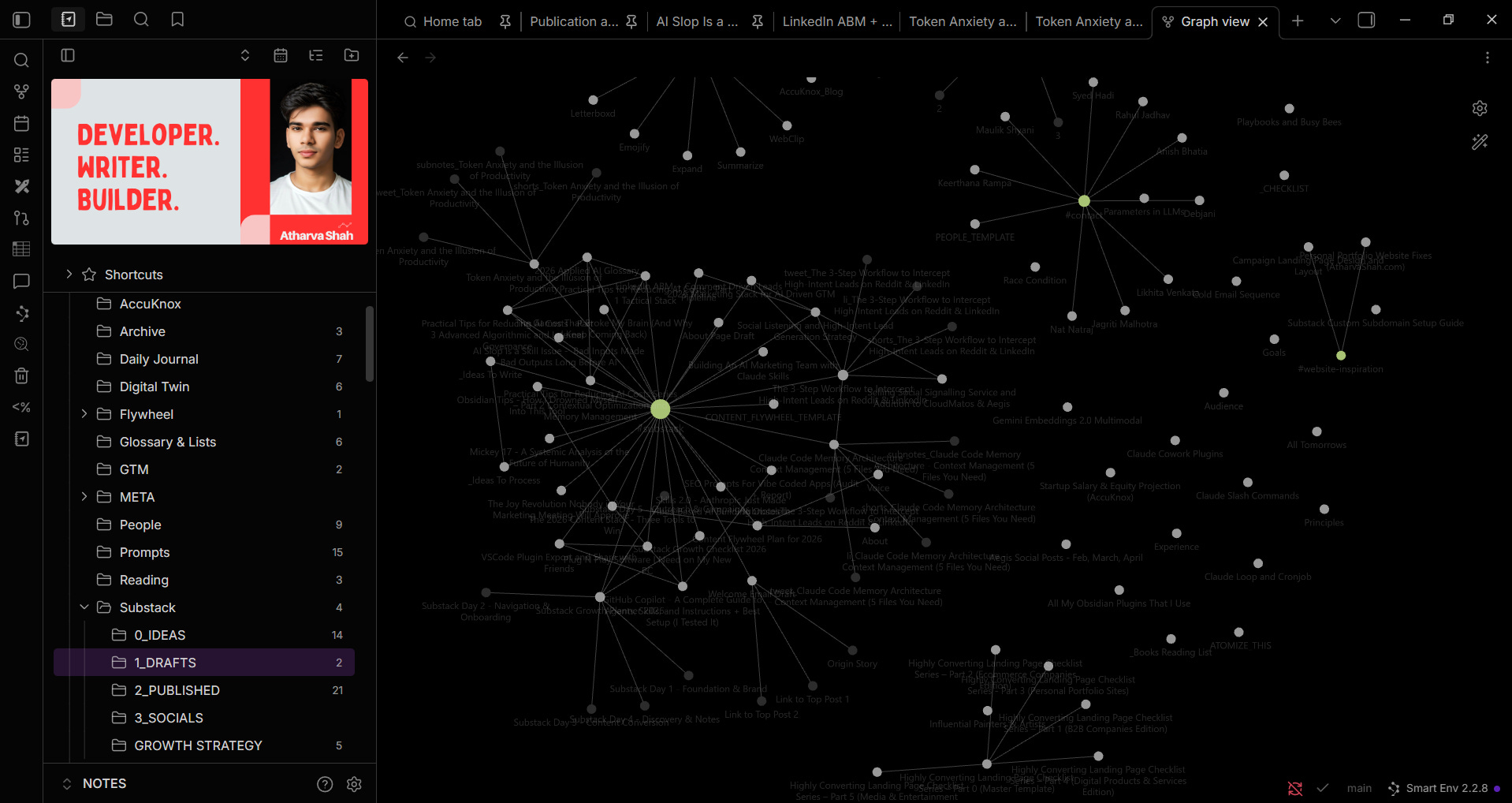
And everything lives in one place. Code snippets, long-form writing, task checkboxes, diagrams, journal entries, project plans. One vault. One search. One backup. The cognitive overhead of remembering which app holds which type of information drops to zero.
I drowned myself in it today, and I’m not swimming back.