

I Almost Spent $250 on LinkedIn Auto-Comments. Then I Found This.
Spoiler: It's completely free. Yes, really. I genuinely love this.


The Problem (That’s Been Eating at Me)
I wanted to grow my LinkedIn reach. You know the drill:
Engage with posts ✓
Leave thoughtful comments ✓
Do this consistently ✓
Don’t lose your mind ✗
So I went hunting for tools. Auto-comment tools. The kind that would save my sanity and my scrolling thumb.
What I found: A wasteland of $49/month “basic” plans that rate-limit you to 20 comments per day. There were also tools with $17/month plans but still restrictive.
(That’s $1.63 per day for just 20+ comments if you do the math. I did the math. I was sad.)
The Tool Cemetery
I tested everything. Tools that promised the moon. Tools with sleek landing pages and testimonials from “Sarah K., Marketing Director.”
The reality:
7-day trials that guilt-trip you into subscribing
Freemium plans that are essentially paid plans in disguise
Rate limits so strict you’d be better off typing manually
Price tags that made my wallet weep
I was literally about to drop $250 on an annual subscription when I thought: “There HAS to be a better way.”

Enter: Butterfly 🦋
A Chrome extension with 4 ratings. FOUR.
(I know what you’re thinking. “Only 4 reviews? Is this a scam?” I thought the same thing.)
But here’s the thing: It actually works.
Links
GitHub: Butterfly Repository
Chrome Store: Install Extension
What makes it different?
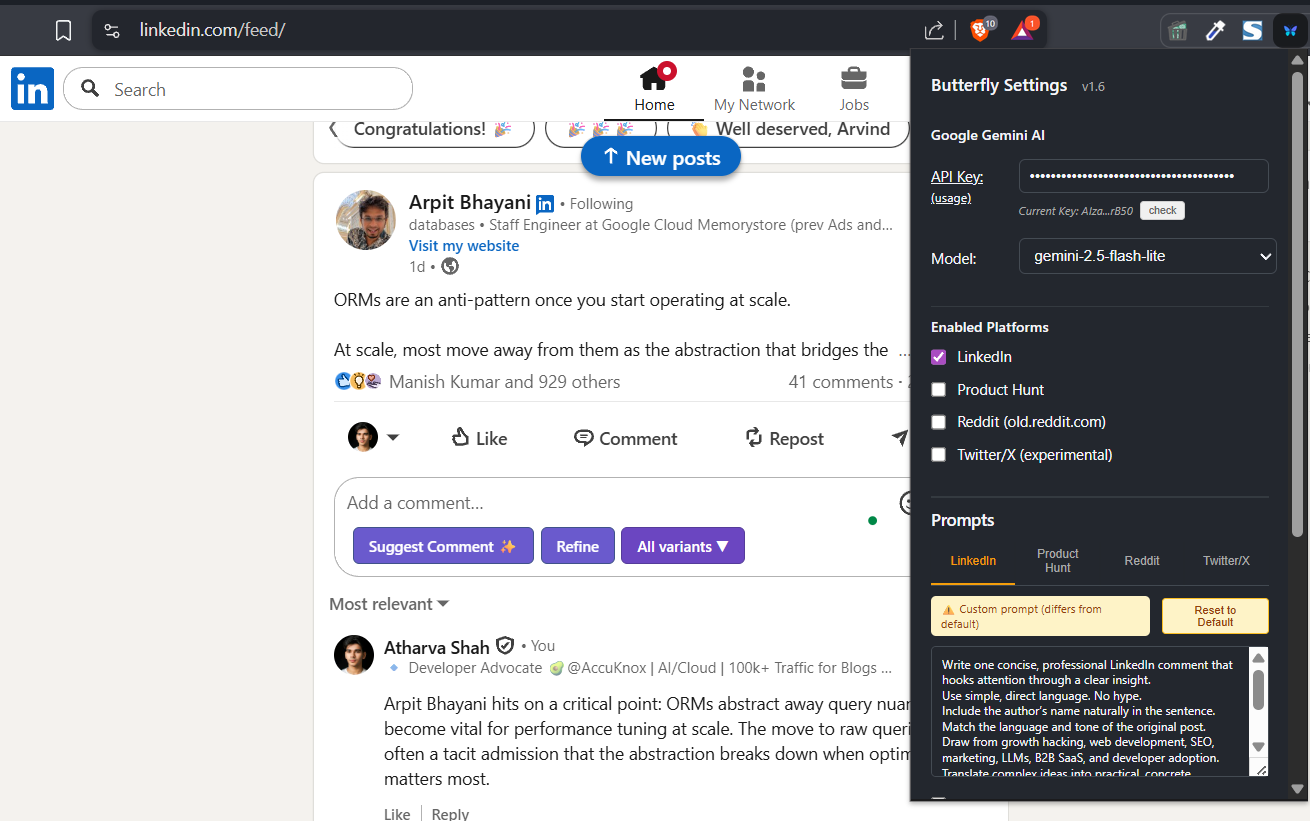
It’s not a SaaS platform charging you monthly rent. It’s a simple extension that uses YOUR free Gemini API key.
The setup:
Install the extension
Grab your free Gemini API key (Google gives you one)
Paste it in
Add your custom prompt
Done.
The Free Models You Get
Google’s generous with their API tier:
Gemini 2.5 Flash → 20 requests/day
Gemini 2.5 Lite → Even more
Gemini 3.0 Flash (preview) → Also available
Translation: You can comment 20+ times daily without spending a cent.
(And if you need more? Just switch models. It’s like having multiple free passes.)
Why This Blows My Mind
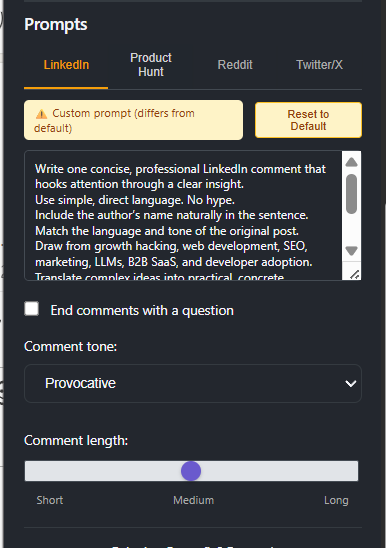
Full customization control:
✅ Custom master prompt (write in your voice)
✅ Comment tone selection
✅ Length control
✅ Option to end with questions
✅ Multi-platform support (LinkedIn, and others)
What you DON’T get:
❌ Monthly subscription emails
❌ “Upgrade to unlock more features!” popups
❌ Artificial 5-comment-per-day limits
❌ Your credit card on file

The Catch? (There Isn’t One)
The only “limit” is Gemini’s free tier rate limit. But compared to paying $17-250/year for the same functionality with worse limits?
Yeah. No contest.
My Honest Take
I spent 3 hours researching this rabbit hole. Tested multiple tools. Got frustrated. Almost gave up.
Then I found Butterfly and felt like I’d discovered a cheat code that everyone forgot existed.
The kicker? Those expensive tools are probably using the same API approach under the hood. You’re literally paying them to be the middleman.
Should You Try This?
If you’re:
Tired of LinkedIn engagement eating your time
Allergic to monthly subscriptions
Okay with a 2-minute setup process
Want actual control over your comments
Then yes. Try this first before throwing money at other tools.
Final Thought
Sometimes the best solutions aren’t the ones with the biggest marketing budgets. Sometimes they’re the scrappy little extensions with 4 Chrome reviews that just... work.
Shout out to the developer. You saved me $250 and countless hours.
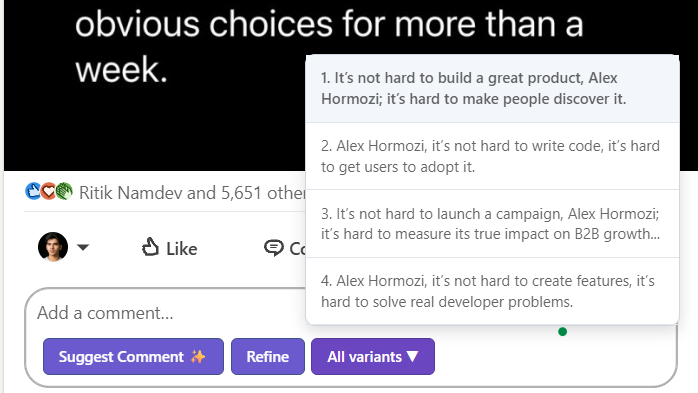
Have you tried Butterfly? Found any other hidden gem tools? Drop a comment—ironically, I’ll probably auto-respond with this extension. 😉
The pricing economics here are eye-opening. Any data privacy tradeoffs using your own key.
Here's the TL;DR version of this:
• Most LinkedIn engagement tools resell free APIs with markup.
• Pricing is disconnected from actual technical value delivered.
• Butterfly runs entirely on your own Gemini API key.
• This removes subscriptions while keeping full prompt control.
• The best tools often have the least marketing.