dbt + Airflow with Cosmos: The Production Pattern That Replaces BashOperator
A working tutorial that turns a dbt project into a granular Airflow DAG with per-model tasks, per-model retries, and full lineage visibility in the Airflow UI.

For most data engineering teams running dbt alongside Apache Airflow, the orchestration glue between the two systems has historically been a single BashOperator calling dbt build. The pattern is familiar, easy to write, and structurally wrong for production.
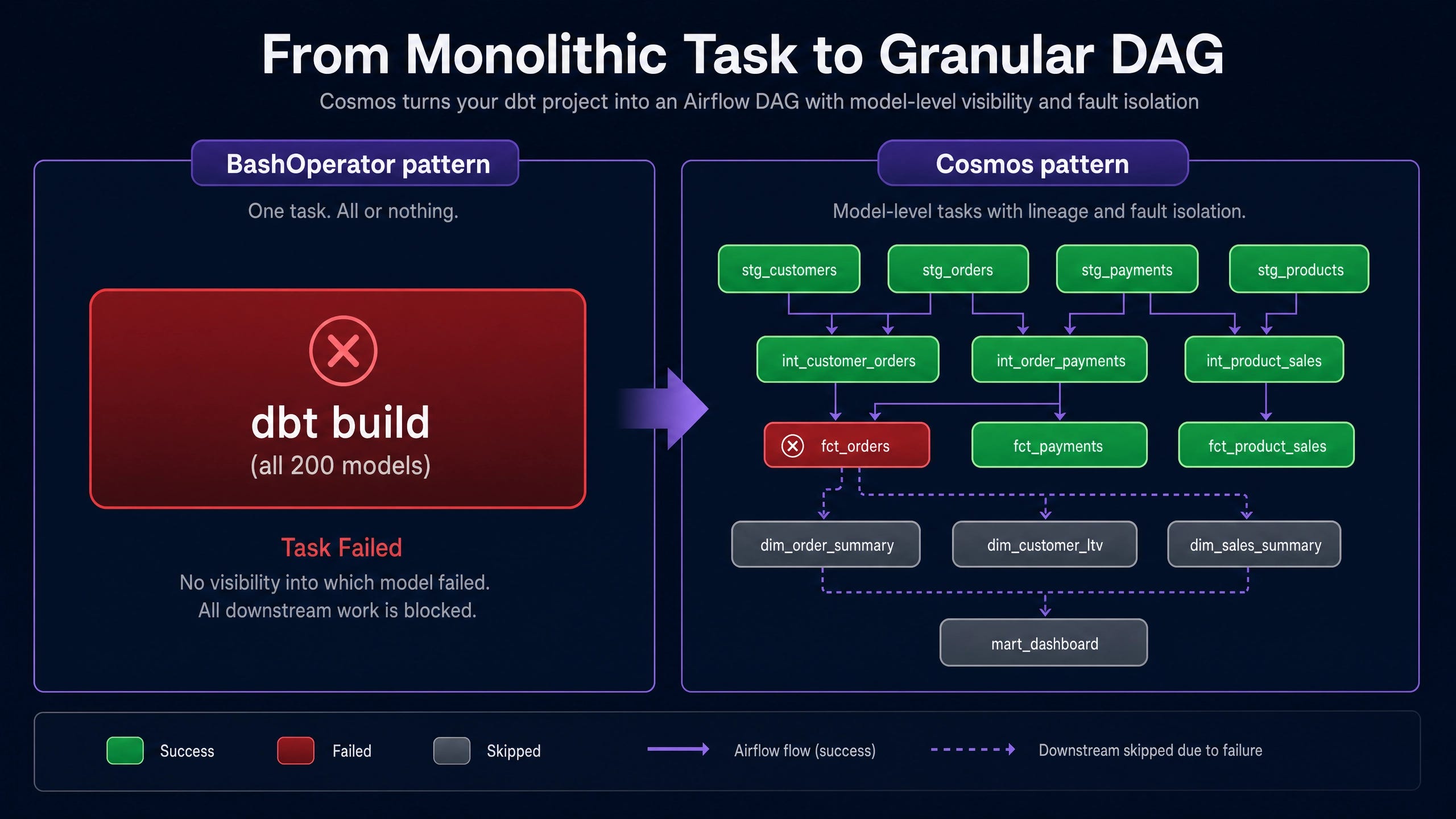
The shape of the problem is straightforward. A BashOperator task running dbt build against a 200-model project is a single Airflow task. The Airflow scheduler sees it as one unit. When model 47 of 200 fails, the whole task fails. Airflow’s UI offers no visibility into which model failed, why, or what the downstream blast radius is. The actual diagnostic work happens in the dbt logs, which Airflow does not surface. Failure recovery requires re-running the entire dbt build.
That pattern is unsustainable at scale. Astronomer’s Cosmos library is the production solution. This walkthrough builds a working setup that turns any dbt project into a granular Airflow DAG with one task per model, lineage-aware dependencies preserved, per-model retries configured, and full visibility surfaced into the Airflow scheduler.
The complete implementation is roughly 100 lines of code including configuration. Engineering teams running dbt under Airflow today should treat this as the default architecture.
Why BashOperator Falls Short
The BashOperator("dbt build") pattern fails three production criteria simultaneously.
Granularity. A single task succeeds or fails atomically. Airflow’s metadata captures one execution record per DAG run regardless of which dbt model actually failed. The dbt CLI parallelizes model execution internally, but Airflow has no visibility into the internal task graph. Operations teams cannot answer “which model is slow?” without leaving the Airflow UI for raw dbt logs.
Recoverability. Retry policies operate at the Airflow task level. A transient warehouse error on model 47 forces a full DAG rerun, which re-executes 46 already-successful models. For projects with non-trivial build times, this is expensive and slow. Airflow’s built-in retry-with-backoff cannot target the failing model specifically.
Observability. Per-model logs, durations, and historical run timings are essential for performance work. The
BashOperatorcollapses them into one aggregate log file. Operations teams cannot answer “isfct_ordersgetting slower over time?” without external log aggregation.
Cosmos addresses each of these directly by treating every dbt model, test, and snapshot as a first-class Airflow task instance.
What Cosmos Actually Does
Cosmos is an open-source library from Astronomer with crossed 200 million downloads as of the 2026 State of Airflow report. The architectural approach is precise: Cosmos parses the dbt project’s manifest.json (generated by dbt parse) and dynamically creates Airflow TaskGroup and task instances corresponding to every dbt node. Dependencies between tasks mirror the dbt DAG. Tests run as their own Airflow tasks immediately after the models they validate.
The integration runs at DAG-parse time, which means the Airflow scheduler sees the full set of tasks as if they were hand-coded. Per-task retry policies, pool assignments, sensor gating, SLA monitoring, and OpenTelemetry traces all apply. The Airflow UI shows the same lineage view that the dbt project has, just rendered through Airflow’s task graph.
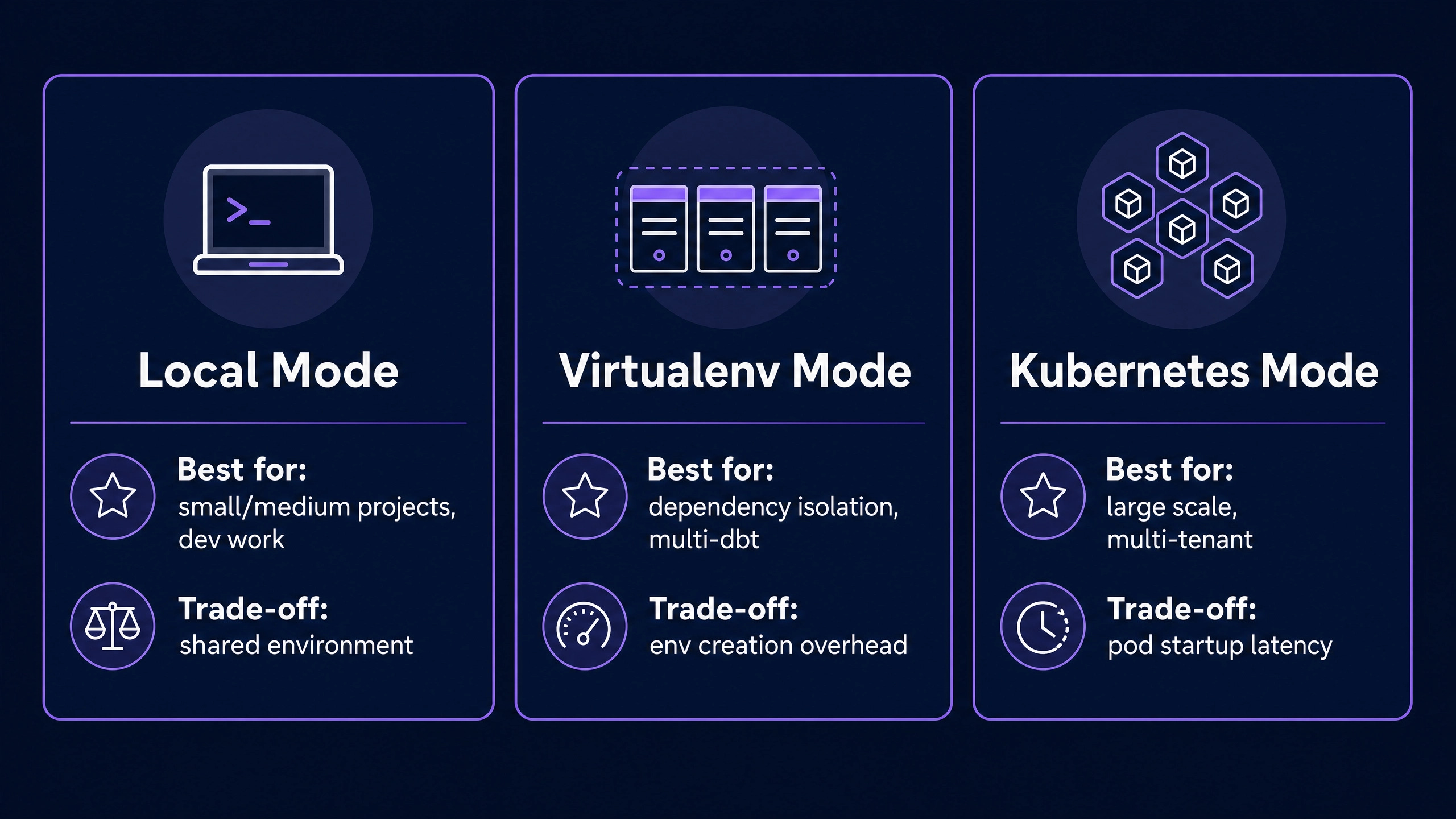
Three execution modes ship with Cosmos. Local execution runs dbt inside the same Python environment as Airflow, which is appropriate for small to medium projects. Virtualenv mode isolates dbt in a per-task virtual environment, which is appropriate for projects with conflicting dependencies. Kubernetes mode runs each task in its own pod, which is appropriate for very large projects where isolation matters more than overhead.
The Working Setup
The walkthrough below targets a local development environment running on Docker via Astronomer’s Astro CLI, with dbt against a local PostgreSQL container. Production deployments use the same DAG code with different connection configuration and execution modes.
Step 1: Provision a local Airflow environment.
The Astro CLI provides a one-command local Airflow setup. Installation on macOS:
brew install astro
mkdir dbt-airflow-cosmos && cd dbt-airflow-cosmos
astro dev init
astro dev init scaffolds a project structure with dags/, requirements.txt, Dockerfile, and a working Docker Compose configuration. The default setup includes the Airflow scheduler, webserver, triggerer, and a PostgreSQL container for both Airflow metadata and a dbt target.
Start the environment:
astro dev startThe Airflow UI is available at
http://localhost:8080
with default credentials admin / admin. The PostgreSQL container is reachable from inside the Airflow container at hostname postgres on port 5432.
Step 2: Clone a sample dbt project.
The jaffle_shop project maintained by dbt Labs serves as a canonical reference. Clone it into the Astro project under a dbt/ folder:
git clone https://github.com/dbt-labs/jaffle-shop.git dbt/jaffle_shopA profiles.yml inside the project pointing at the local Postgres allows direct dbt CLI execution outside of Airflow, which is useful for development:
jaffle_shop:
  target: dev
  outputs:
    dev:
      type: postgres
      host: postgres
      user: postgres
      password: postgres
      port: 5432
      dbname: postgres
      schema: jaffle_shop
      threads: 4
Cosmos itself generates a runtime profiles.yml from the Airflow connection at DAG execution time using profile mapping, so this manual file is optional but practical for hybrid CLI plus Airflow development.
Step 3: Add Cosmos to the project.
Add the Cosmos package to requirements.txt:
astronomer-cosmos[dbt-postgres]==1.11.0The extras syntax pulls in the appropriate dbt adapter (dbt-postgres for this example, replaceable with dbt-snowflake, dbt-databricks, or dbt-bigquery for production deployments).
Restart Astro to install the new dependency:
astro dev restartStep 4: Write the Cosmos DAG.
Create dags/jaffle_shop_dag.py:
from datetime import datetime
from pathlib import Path
from cosmos import DbtDag, ProjectConfig, ProfileConfig, ExecutionConfig
from cosmos.profiles import PostgresUserPasswordProfileMapping
DBT_PROJECT_PATH = Path(”/usr/local/airflow/dbt/jaffle_shop”)
profile_config = ProfileConfig(
profile_name=”jaffle_shop”,
target_name=”dev”,
profile_mapping=PostgresUserPasswordProfileMapping(
conn_id=”postgres_default”,
profile_args={
“schema”: “jaffle_shop”,
},
),
)
jaffle_shop_dag = DbtDag(
project_config=ProjectConfig(DBT_PROJECT_PATH),
profile_config=profile_config,
execution_config=ExecutionConfig(
execution_mode=”local”,
),
schedule=”@daily”,
start_date=datetime(2026, 1, 1),
catchup=False,
dag_id=”jaffle_shop_cosmos”,
default_args={”retries”: 2, “retry_delay”: 300},
tags=[”dbt”, “production”],
)This is the complete DAG. Cosmos handles the rest. The Airflow UI will render jaffle_shop_cosmos with one task per dbt model, dependencies preserved from the project’s manifest.json.
Step 5: Trigger and observe.
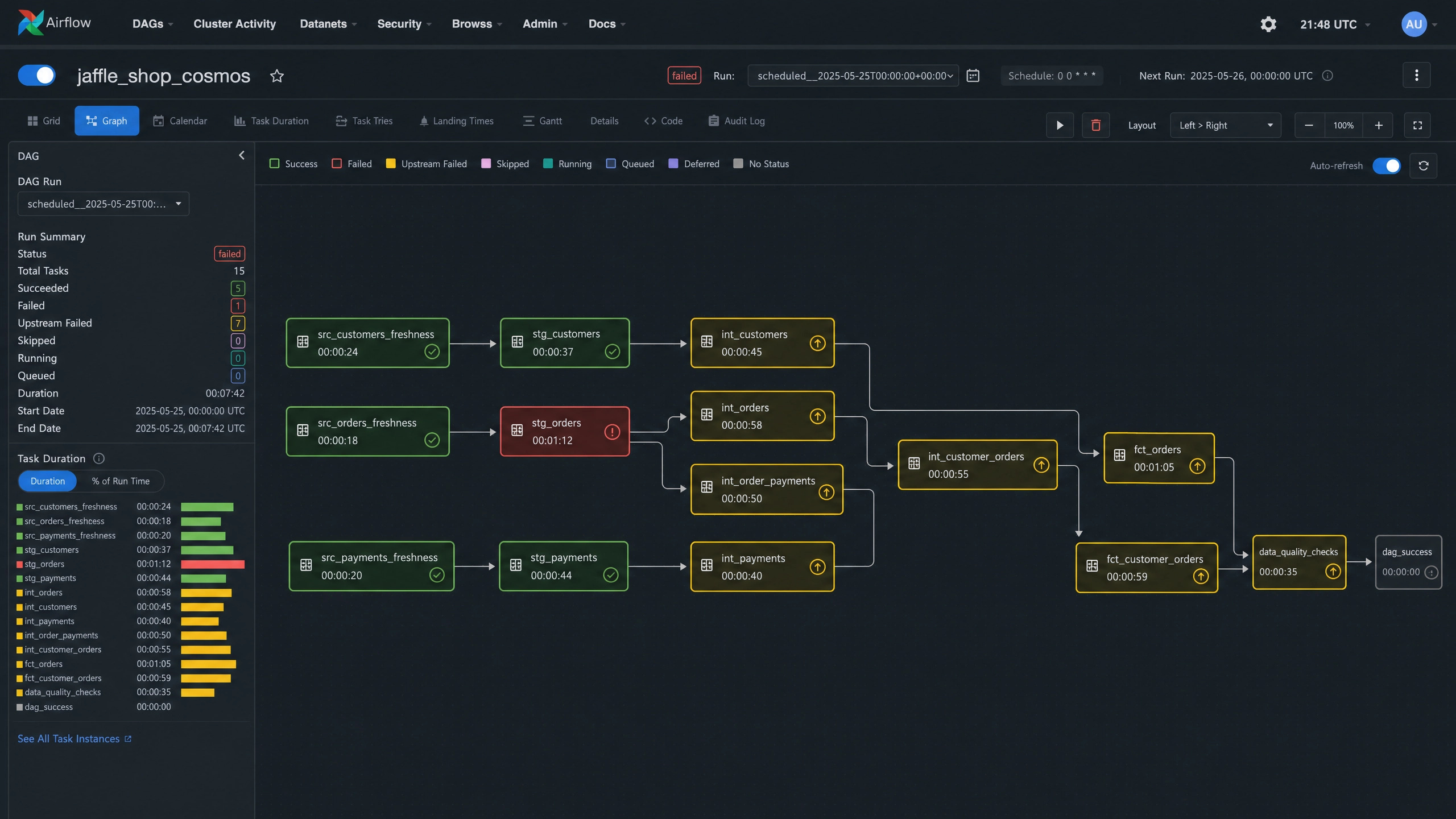
Refresh the Airflow UI. The DAG appears in the list with dbt and production tags. Click into the DAG and trigger a run. The graph view shows each model as a distinct task, executing in dependency order. Per-task logs surface the dbt output. The Gantt view shows execution timing. The XCom tab surfaces any metadata Cosmos collected during the run.
Failure Isolation in Practice
The behavioral difference between BashOperator and Cosmos becomes clearest under failure conditions. Introducing a deliberate fault into models/staging/stg_orders.sql (for example, SELECT * FROM nonexistent_table) demonstrates the recovery pattern.
Under BashOperator, the entire DAG fails. The Airflow UI shows one red task with no useful detail. Recovery requires fixing the SQL and rerunning the full dbt build, which re-executes every model in the project including the ones that succeeded.
Under Cosmos, only the stg_orders task turns red. Downstream tasks that depend on stg_orders (the intermediate and mart models touching orders) move to an upstream_failed state. The unaffected upstream tasks remain green. Recovery is targeted: fix the SQL, click the retry button on the failed task, and Airflow re-executes only the failed task and its downstream chain. The successful upstream work is preserved.
This pattern matters at scale. On a 500-model dbt project with 30-minute total build time, a single-model failure under BashOperator costs 30 minutes per retry attempt. The same failure under Cosmos costs the failing model plus its downstream chain, typically two to five minutes.
Execution Modes for Production
The execution_mode="local" setting in the example runs dbt inside the same Python environment as Airflow. This is appropriate for development and small production workloads. Two alternative modes ship with Cosmos.
Virtualenv mode (
execution_mode="virtualenv") creates a per-task Python virtual environment. This is the right choice for projects with conflicting dependencies between Airflow plugins and dbt adapters, or for teams running multiple dbt versions across different DAGs. The trade-off is virtualenv creation overhead per task.Kubernetes mode (
execution_mode="kubernetes") runs each task in its own Kubernetes pod. This is the right choice for very large projects, multi-tenant deployments, or environments with strict isolation requirements. The trade-off is pod startup overhead.
The October 2025 release of Cosmos (version 1.11) added Watcher Mode, which keeps the dbt manifest in memory and incrementally updates as the project changes. Astronomer’s published numbers report up to 80 percent runtime reduction on large projects. For dbt projects exceeding 500 models, Watcher Mode is the difference between hourly and minute-level latency.
Cosmos in the Orchestration Landscape
For teams choosing between orchestration patterns in 2026, the decision matrix lands as follows.
The clearest decision rule: organizations already running Airflow with non-trivial dbt workloads should standardize on Cosmos. Organizations starting fresh with no existing orchestrator should evaluate Dagster against Airflow plus Cosmos, weighted by the broader team’s Python infrastructure preferences.
Production Hardening Patterns
A production Cosmos deployment typically extends the minimal DAG above with five operational concerns.
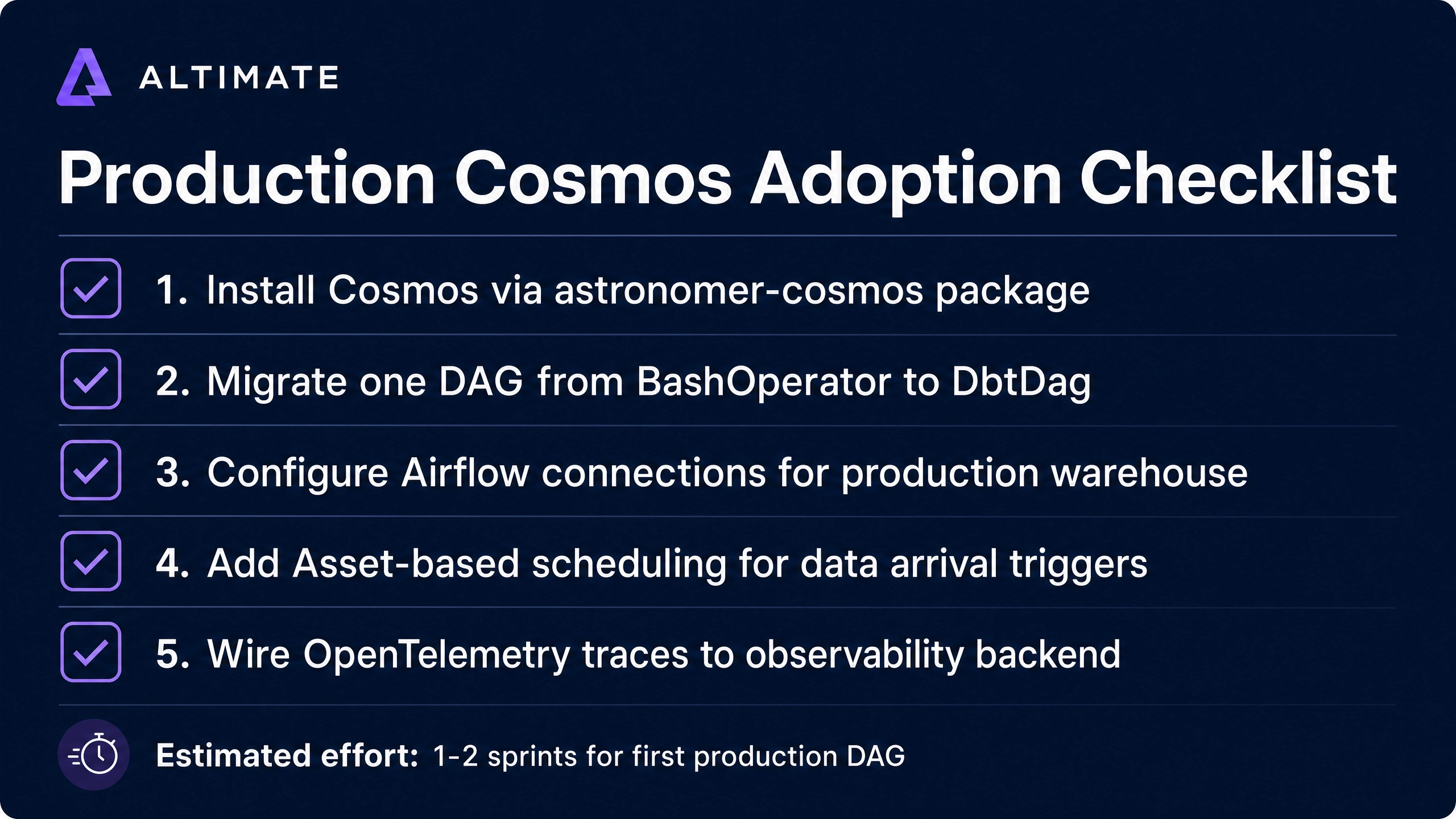
Connection management via Airflow Connections. Production deployments replace the local Postgres connection with the production warehouse connection (Snowflake, Databricks, BigQuery) configured through Airflow’s connection store. Cosmos’s profile mappings cover all major adapters.
Asset-based scheduling. Airflow 3’s asset model allows the dbt DAG to be triggered by upstream data arrival rather than on a wall-clock schedule. A Fivetran sync DAG can emit an asset event on completion, which triggers the Cosmos dbt DAG automatically. This eliminates the brittle “run dbt at 3am hoping the data arrived by then” pattern.
Pool assignment for warehouse capacity. Cosmos exposes Airflow pool assignment per task. Models targeting expensive Snowflake warehouses can be routed to a dedicated pool with concurrency limits to prevent runaway compute spend.
Slack alerting on red models. A callback handler on task failure can push notifications to a dedicated Slack channel with the model name, error message, and link to the Airflow log. This collapses the incident detection-to-action loop.
OpenTelemetry instrumentation. Airflow 3 ships with OpenTelemetry support. Adding the standard OpenTelemetry exporter routes per-task traces to whatever observability backend the organization uses (Datadog, New Relic, Honeycomb), unifying dbt run observability with the rest of the data platform.
Strategic Implications
The Cosmos pattern is more than a tactical orchestration choice. It reflects a broader architectural shift in how data teams structure the boundary between transformation logic (dbt) and orchestration logic (Airflow, Dagster, Prefect). Treating every dbt model as a first-class orchestration node lets data teams unify observability, retries, alerting, and dependency management across the entire pipeline.
For Altimate’s positioning in the agentic data engineering category, Cosmos is relevant context. An agentic harness like Altimate Code that can read the same dbt manifest and orchestrate runs through the same Airflow surface has natural integration paths into existing operational tooling. Engineering teams running dbt under Cosmos can add agentic capabilities (blast-radius analysis on PRs, automated test generation, schema validation) without restructuring their orchestration stack.
The takeaway for data engineering teams running dbt under Airflow: if BashOperator is still the orchestration glue, Cosmos is the upgrade path. The implementation is roughly one Python file. The operational benefits compound from the first DAG run. The strategic benefit is alignment with the broader 2026 modern data stack pattern of treating dbt as the orchestration substrate that every other tool integrates with.