

A Vibe-Coded App with No SEO Is a Storefront with No Sign (Here's the Fix)
AI builds clean components and skips discoverability entirely. Here's the two-prompt fix.


The Invisible Tax on Every Vibe-Coded App
You shipped the app. The landing page is tight. The product works. And nobody is finding it.
This is the silent failure mode of vibe coding. You prompt an AI to build your entire React app in an afternoon. It generates clean components, handles routing, even sets up a decent UI. What it does not do - what it will never do unprompted - is make any of it discoverable.
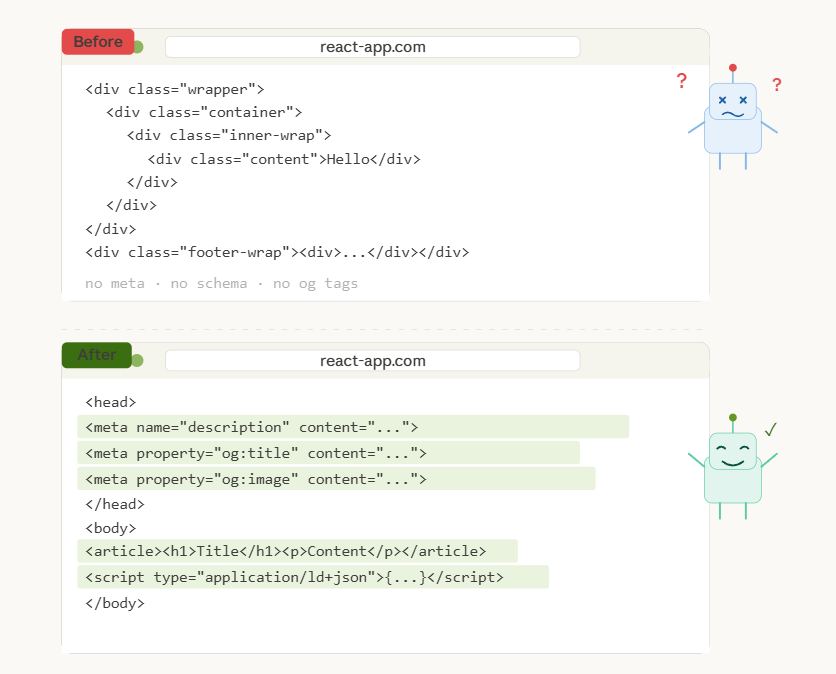
No meta tags. No sitemap. No semantic HTML structure. No OpenGraph cards. No JSON-LD schema. No alt text on images. No canonical URLs. The app is technically alive and functionally invisible.
Search engines see a blank shell. Social platforms render a generic link preview. AI crawlers find nothing worth indexing. You have built a storefront with no sign on the door.
Why This Happens
AI code generators optimize for function, not findability. When you ask Claude or GPT to “build me a portfolio site” or “create a SaaS landing page,” the model focuses on what the user sees in the browser. Title tags, meta descriptions, structured data - these are invisible to the user, so they are invisible to the model’s priorities.
The result is a pattern I see constantly. Founders vibe-code an MVP, ship it, start running ads, and wonder why organic traffic is zero. The answer is almost always the same. The app has no SEO foundation whatsoever.
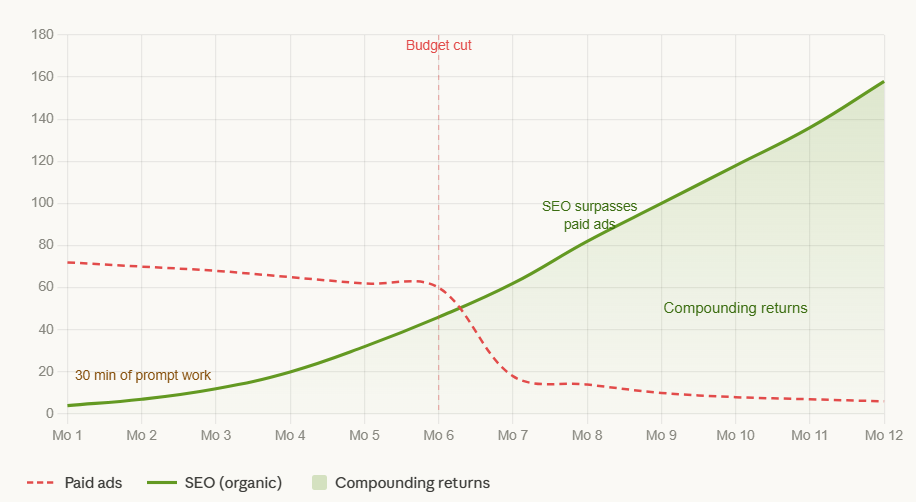
This is not a minor oversight. Organic search is the single highest-ROI acquisition channel for most software products. Paid ads stop working the moment you stop paying. SEO compounds. A properly optimized page can generate traffic for years. But only if the technical foundations exist.
The Cost of Doing Nothing
Here is what happens when you skip SEO on a vibe-coded app.
Google cannot understand your page hierarchy because every element is a div inside a div inside a div. There is no semantic structure telling crawlers what the page is about.
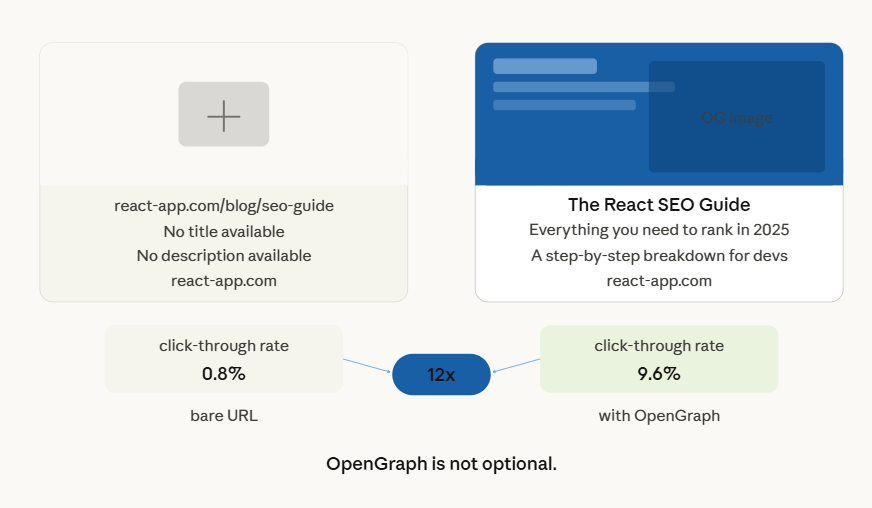
Social sharing falls flat. When someone drops your link on Twitter or LinkedIn, there is no OpenGraph image, no title, no description. Just a bare URL. Click-through rates plummet.
AI search engines - the ones increasingly replacing traditional search for discovery - cannot index your content because it requires JavaScript execution to render, and you have provided no structured data to make it crawl-ready.
Your competitors who spent ten minutes on SEO are outranking you for every keyword that matters. Not because their product is better. Because their product is findable.
What These Prompts Actually Do
I built two prompts that fix this entire problem. They are designed to be dropped directly into an AI coding agent - Claude, Cursor, Copilot, whatever you use - and pointed at your React codebase. The first one audits and fixes. The second one documents everything it did.
The audit prompt follows a strict four-phase execution model. It crawls your project structure, identifies every public-facing route, and builds a complete SEO plan before touching a single file. This is critical. You do not want an AI blindly injecting meta tags without understanding your site architecture first.
Phase one maps your routes and proposes a strategy. Phase two builds the technical infrastructure - robots.txt, sitemap, dependency setup. Phase three optimizes every page with unique meta tags, OpenGraph cards, semantic HTML, and clean URLs. Phase four handles performance - lazy loading, dynamic meta generation for parameterized routes, JSON-LD schema for AI crawlers.
The prompt also includes a safety constraint. It generates a plan file first and waits for your approval before modifying any application code. You stay in control.
Prompt 1 - The SEO Audit and Fix
Drop this into your AI coding agent with your React project loaded. It will analyze your codebase, generate an SEO plan, and then implement fixes across every route.
Role: You are an Expert Senior Full-Stack Engineer and SEO Specialist.

Task: Perform a comprehensive SEO overhaul of this React workspace. You must follow a strict "Plan-First" execution model.

Phase 1: Analysis & Documentation
Crawl the Project: Scan the /src folder, especially routes (e.g., App.js, routes.tsx, or react-router configs) to identify every public-facing page.

Sitemap Audit: Locate or create a strategy for a dynamic sitemap.xml.

Deliverable: Create a file named SEO_PLAN.md documenting:

A list of all identified routes.

The proposed robots.txt configuration.

A plan for implementing react-helmet-async for head management.

A strategy for OpenGraph (OG) tags and structured data (JSON-LD).

Phase 2: Technical Infrastructure
Robots & Sitemap: Generate a robots.txt in the /public folder. Create a script (or a manual sitemap.xml) that includes all routes found in Phase 1.

Dependency Setup: Install react-helmet-async.

Global Provider: Wrap the application in the HelmetProvider at the root level.

Phase 3: Page-Level Optimization
For every page component identified:

Meta Tags: Add unique <title> and <meta name="description"> tags.

Social Graph: Implement OpenGraph (og:title, og:description, og:image) and Twitter Card tags.

Semantic HTML: Review the JSX. Ensure the page uses a logical heading hierarchy (<h1> for main titles, <h2> for sections) and semantic tags (<main>, <article>, <nav>).

Clean URLs: Ensure all Link components use human-readable slugs.

Phase 4: Performance & Programmatic SEO
Image Optimization: Identify <img> tags and suggest/implement loading="lazy" and descriptive alt text.

Dynamic Routes: If the app uses dynamic parameters (e.g., /products/:id), create a pattern to generate unique meta tags based on the data being fetched.

Optimize all page Title Tags to fall between 50–60 characters and implement a site-wide JSON-LD 'Organization' and 'WebPage' Schema to clarify brand identity for LLMs and search engines. . Ensure all critical brand and service information is 'crawl-ready' without requiring JavaScript execution to prevent data loss during AI indexing.

Constraints:

Do not break existing CSS or functional logic.

Use react-helmet-async instead of the legacy react-helmet.

Prioritize "Human-Readable" code and SEO-friendly URL structures.

Wait for my approval on SEO_PLAN.md before modifying any application files.
Why the Plan-First Approach Matters
Most people would just tell an AI to “add SEO to my app.” That is a mistake. Without a plan phase, the AI will make assumptions about your site structure, duplicate meta descriptions across pages, and miss routes entirely.
The plan-first constraint forces the AI to do analysis before implementation. You get a document you can review. You can catch issues like missing routes or incorrect keyword targeting before any code changes happen. This is the difference between a professional SEO implementation and a slapdash one.
Prompt 2 - The SEO Report Generator
After the audit prompt has done its work, run this second prompt. It compares the before-and-after state of your codebase and generates a professional report documenting every change, why it was made, and how it impacts your search performance.
This is not just documentation for documentation’s sake. If you are building for a client, this report is a deliverable. If you are building for yourself, it is a reference you will need six months from now when you are wondering why a particular meta description was chosen or what schema type was applied to a specific page.
The report covers five areas. An executive summary comparing SEO health before and after. A log of every new file created and why. A page-by-page breakdown of every tag, keyword, and semantic improvement. An architecture log explaining dependency choices. And a performance section detailing Core Web Vitals impact.
**Role:** You are a Senior Technical SEO Auditor.

**Task:** Conduct a post-implementation review of the SEO overhaul performed on this React workspace. You must generate a professional, comprehensive report named `SEO_REPORT.md`.

**Scope of Analysis:**

1. Compare the current state of the `/src` and `/public` folders against standard React SEO best practices.

2. Identify every component where `react-helmet-async` or SEO meta tags were added.

3. Identify all new files created (e.g., `sitemap.xml`, `robots.txt`, `SEO_PLAN.md`).


**Report Structure Requirements:**

### 1. Executive Summary

- Provide a high-level overview of the SEO health of the application before vs. after implementation.


### 2. Technical Infrastructure Changes

For every **New File** created (e.g., `robots.txt`, `sitemap.xml`):

- **File Path:** [Path to file]

- **Purpose:** Why was this specific file created?

- **Impact:** How does this file affect search engine crawlers (indexing, crawl budget, etc.)?


### 3. Page-by-Page Breakdown

Create a section for **every page/route** modified. For each page, document:

- **Component Name & Path:**

- **Elements Added:** List specific Tags (Title, Meta Description, OG Tags, Schema.json).

- **Technical Decisions:** Why was this specific keyword or description chosen for this route?

- **Semantic Improvements:** Note if tags like `<div>` were changed to `<main>`, `<article>`, or if `<h1>`-`<h6>` hierarchy was corrected.

- **SEO Impact:** Explain how these specific changes improve the "Relevancy Score" for that page.


### 4. Dependency & Architecture Log

- **Library Choice:** Document the use of `react-helmet-async`.

- **Decision Logic:** Why did we use an asynchronous head manager instead of standard React state? (Mention thread safety and SSR compatibility).

- **Global Configuration:** Detail the `HelmetProvider` implementation at the root level.


### 5. Performance & Accessibility (A11y)

- List improvements made to `<img>` alt tags and `loading="lazy"` attributes.

- Explain how these changes impact Core Web Vitals (LCP, CLS).


**Tone:** Professional, technical, and data-driven. Use tables where appropriate to compare "Before" and "After" states for meta-titles and descriptions.

**Final Output:** Save all of this into `SEO_REPORT.md` in the root directory.
How to Use These Together
The workflow is simple. Open your vibe-coded React project in your AI coding environment. Paste the first prompt. Let it generate the SEO plan. Review the plan, make adjustments if needed, then approve it. The AI implements all the fixes.
Once that is done, paste the second prompt. It scans the changes and generates a complete audit trail. You now have a fully SEO-optimized app and a professional report documenting exactly what was done and why.
The entire process takes maybe thirty minutes. The alternative - hiring an SEO consultant to manually audit a React app - costs thousands and takes weeks. These prompts give you 80% of that output at effectively zero cost.
Beyond React
These prompts are written for React with react-helmet-async, but the underlying principles apply to any framework. If you are using Next.js, swap the helmet references for the built-in Head component. If you are using Astro or SvelteKit, adapt the meta tag strategy to their native patterns. The four-phase structure - analyze, build infrastructure, optimize pages, tune performance - works regardless of your stack.
The real insight here is not about React or any specific framework. It is that vibe-coded apps have a systematic blind spot around discoverability. Every AI-generated codebase needs a post-generation SEO pass. These prompts make that pass repeatable and thorough.
Ship fast, then make it findable. That is the order of operations.